12
13
2025
v6プラスサービスで固定IPとMAP-Eによるマルチホーム化を試みる(その2)
v6プラスの固定IPサービスでのSubnet IDの取り扱い
v6プラスのMAP-Eでは、Subnet IDの使い方に制約があり、IPv6でのネットワーク分割を行うにはかなりトリッキーな設定を行わなければならなかったが、固定IPサービスでも同じ制約に悩まされた.
MAP-Eと同じ方法で制約を回避することができたので、その実装方法を例示する.
先ずは『v6プラス 「固定IPサービス」 設定ガイド』の内容に従って、固定IP接続の設定を行う.
  ...
!
ip ufs-cache max-entries 20000
ip ufs-cache enable
ip route default Tunnel0.0
ip dhcp enable
!
ipv6 ufs-cache max-entries 10000
ipv6 ufs-cache enable
ipv6 dhcp enable
!
ipv6 access-list block-list deny ip src any dest any
ipv6 access-list dhcpv6-list permit udp src any sport any dest any dport eq 546
ipv6 access-list dhcpv6-list permit udp src any sport any dest any dport eq 547
ipv6 access-list icmpv6-list permit icmp src any dest any
ipv6 access-list tunnel-list permit 4 src any dest any
ipv6 access-list other-list permit ip src any dest any
ipv6 access-list dynamic cache 65535
ipv6 access-list dynamic dflt-list access other-list
!
ddns enable
!
proxy-dns ip enable
proxy-dns ip request both
!
ip dhcp profile dhcpv4-sv
  dns-server 192.168.1.1
!
ipv6 dhcp client-profile dhcpv6-cl
  option-request dns-servers
  ia-pd subscriber GigaEthernet1.0 ::/64 eui-64    <=== Subnet ID は 0
!
ipv6 dhcp server-profile dhcpv6-sv
  dns-server dhcp
!
ddns profile ddns-v6plus-profile
  url http://fcs.enabler.ne.jp/update
  query user=A01234567&pass=*********
  transport ipv6
  notify-interface GigaEthernet1.0
  source-interface GigaEthernet1.0
  update-interval 10
!
interface GigaEthernet0.0
  no ip address
  ipv6 enable
  ipv6 traffic-class tos 0
  ipv6 dhcp client dhcpv6-cl
  ipv6 filter dhcpv6-list 1 in
  ipv6 filter icmpv6-list 2 in
  ipv6 filter tunnel-list 3 in
  ipv6 filter block-list 100 in
  ipv6 filter dhcpv6-list 1 out
  ipv6 filter icmpv6-list 2 out
  ipv6 filter tunnel-list 3 out
  ipv6 filter dflt-list 100 out
  no shutdown
!
interface GigaEthernet1.0
  ip address 192.168.1.1/24
  ip dhcp binding dhcpv4-sv
  ipv6 enable
  ipv6 interface-identifier 00:3b:xx:yy:f0:00:00:00  <=== 指定された Interface ID
  ipv6 dhcp server dhcpv6-sv
  ipv6 nd ra enable
  ipv6 nd ra other-config-flag
  no shutdown
!
interface Tunnel0.0
  tunnel mode 4-over-6
  tunnel destination 2404:9200:225:100::65 <=== 指定されたBRのIPv6アドレス
  tunnel source GigaEthernet1.0
  ip address 59.XXX.YYY.ZZZ/32           <=== 指定されたIPv4固定IPアドレス
  ip tcp adjust-mss auto
  ip napt enable
  no shutdown
!
ix2215-01(config)# show ipv6 addr
Interface GigaEthernet0.0 is up, line protocol is up
  Global address(es):
    240b:xxxx:yyyy:f400:: prefixlen 56 anycast
  Link-local address(es):
    fe80::260:b9ff:fee2:4624 prefixlen 64
    fe80:: prefixlen 64 anycast
  ...

Interface GigaEthernet1.0 is up, line protocol is up
  Global address(es):
    240b:xxxx:yyyy:f400:3b:zzzz:f000:0 prefixlen 64
      Valid lifetime 13920, preferred lifetime 12120
    240b:xxxx:yyyy:f400:: prefixlen 64 anycast
  Link-local address(es):
    fe80::3b:zzzz:f000:0 prefixlen 64
    fe80:: prefixlen 64 anycast


ix2215-01(config)# show ddns          <=== IPv6 prefix変更通知
profile-name : ddns-v6plus-profile
  Registered time : 2025/12/13 09:53:54
  IPv6 address    : 240b:xxxx:yyyy:f400:3b:zzzz:f000:0
  result
    HTTP/1.1 200 OK
    Date: Sat, 13 Dec 2025 00:53:54 GMT
    Content-Type: text/plain; charset=UTF-8
    Content-Length: 2
    Connection: close
    Server: Apache
    Cache-Control: no-cache, private
    Set-Cookie: XSRF-TOKEN=ox1JyZPtIskx ... KcILwP8xN1VXhz; expires=Sat, 13-Dec-2025 02:53:54 GMT; Max-Age=7200; path=/
    Set-Cookie: laravel_session=eyJpdiI6 ... gifQ%3D%3D; path=/; httponly
    X-Content-Type-Options: nosniff
    X-XSS-Protection: 1; mode=block

    OK

ix2215-01(config)# show int Tunnel0.0
Interface Tunnel0.0 is up
  Fundamental MTU is 1460 octets
  Current bandwidth 1G b/s, QoS is disabled
  Datalink header cache type is ipv6-tunnel: 1/0 (standby/dynamic)
  IPv4 subsystem connected, physical layer is up, 0:08:53
  Dialer auto-connect is enabled
  Inbound call is enabled
  Outbound call is enabled
  Dial on demand restraint is disabled, 0 disconnect
  SNMP MIB-2:
    ifIndex is 1208
  Logical INTERFACE:
    Elapsed time after clear counters 0:09:20
    205 packets input, 63075 bytes, 0 errors
      205 unicasts, 0 non-unicasts, 0 unknown protos
      0 drops, 0 misc errors
    135 output requests, 43398 bytes, 0 errors
      135 unicasts, 0 non-unicasts
      0 overflows, 0 neighbor unreachable, 0 misc errors
    1 link-up detected, 0 link-down detected
  Encapsulation TUNNEL:
    Tunnel mode is 4-over-6
    Tunnel is ready
    Destination address is 2404:9200:225:100::65        <=== JPIX BR アドレス
    Source address is 240b:xxxx:yyyy:f400:3b:zzzz:f000:0  <=== こちらのIPv6トンネルのアドレス
    Source interface GigaEthernet1.0
    Nexthop address is fe80::d677:98ff:fe1c:6f53
    Outgoing interface is GigaEthernet0.0
    Interface MTU is 1460
    Path MTU is 1500
    Tunnel-link cache:
      d4:77:98:1c:6f:53:00:60:b9:e2:46:24:86:dd
    Statistics:
      205 packets input, 63075 bytes, 0 errors
      135 packets output, 43398 bytes, 0 errors
    Received ICMP messages:
      0 errors
ix2215-01(config)#
この設定では問題なく固定IPv4アドレスでの接続ができている.割り当てられた固定IPv4アドレスは今回契約しているI.S.P.のかもめインターネットが所有するアドレスのようだ.
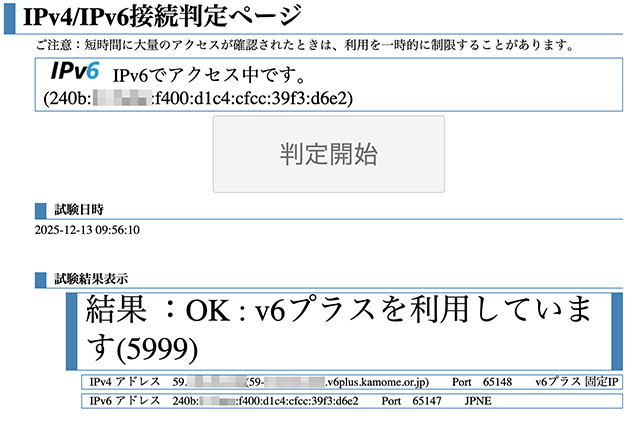
Subnet IDが 0 の場合は問題なく接続できている
MAP-Eの場合と同様に Subnet ID を "c9"(201)とすると、やはりMAP-Eの場合と同じく接続できなくなる.
 ...

ipv6 dhcp client-profile dhcpv6-cl
  option-request dns-servers
  ia-pd subscriber GigaEthernet1.0 ::c9:0:0:0:fe/64   <=== Subnet ID "c9" (201)
!

--------

ix2215-01(config)# show ipv6 addr
Interface GigaEthernet0.0 is up, line protocol is up
  Global address(es):
    240b:xxxx:yyyy:f400:: prefixlen 56 anycast
  Link-local address(es):
    fe80::260:b9ff:fee2:4624 prefixlen 64
    fe80:: prefixlen 64 anycast
  ...

Interface GigaEthernet1.0 is up, line protocol is up
  Global address(es):
    240b:xxxx:yyyy:f4c9::fe prefixlen 64           <=== Interface ID が設定されていない
      Valid lifetime 14363, preferred lifetime 12563
    240b:xxxx:yyyy:f4c9:: prefixlen 64 anycast
  Link-local address(es):
    fe80::3b:zzzz:f000:0 prefixlen 64
    fe80:: prefixlen 64 anycast
  ...

ix2215-01(config)# show ddns
profile-name : ddns-v6plus-profile
  Registered time : 2025/12/13 17:01:39
  IPv6 address    : 240b:xxxx:yyyy:f4c9::fe   <=== 間違ったアドレスが通知されている
  result
    HTTP/1.1 200 OK
    Date: Sat, 13 Dec 2025 08:01:40 GMT
    Content-Type: text/plain; charset=UTF-8
    Content-Length: 2
    Connection: close
    Server: Apache
    Cache-Control: no-cache, private
    Set-Cookie: XSRF-TOKEN=QfRSQsiInp ... ZerMJmsPdV6nLV; expires=Sat, 13-Dec-2025 10:01:40 GMT; Max-Age=7200; path=/
    Set-Cookie: laravel_session=eyJpd .... ZzU1QxM0RZTA2In0%3D; path=/; httponly
    X-Content-Type-Options: nosniff
    X-XSS-Protection: 1; mode=block

    OK

ix2215-01(config)# show int Tunnel0.0
Interface Tunnel0.0 is up
  Fundamental MTU is 1460 octets
  Current bandwidth 1G b/s, QoS is disabled
  Datalink header cache type is ipv6-tunnel: 1/0 (standby/dynamic)
  IPv4 subsystem connected, physical layer is up, 0:01:34
  Dialer auto-connect is enabled
  Inbound call is enabled
  Outbound call is enabled
  Dial on demand restraint is disabled, 0 disconnect
  SNMP MIB-2:
    ifIndex is 1208
  Logical INTERFACE:
    Elapsed time after clear counters 0:01:48
    0 packets input, 0 bytes, 0 errors         <=== IPv6 inboundパケットは勿論 0
      0 unicasts, 0 non-unicasts, 0 unknown protos
      0 drops, 0 misc errors
    436 output requests, 44892 bytes, 0 errors       <=== IPv6 outboundパケットはBRに流れている
      436 unicasts, 0 non-unicasts
      0 overflows, 0 neighbor unreachable, 0 misc errors
    1 link-up detected, 0 link-down detected
  Encapsulation TUNNEL:
    Tunnel mode is 4-over-6
    Tunnel is ready
    Destination address is 2404:9200:225:100::65
    Source address is 240b:xxxx:yyyy:f4c9::fe
    Source interface GigaEthernet1.0
    Nexthop address is fe80::d677:98ff:fe1c:6f53
    Outgoing interface is GigaEthernet0.0
    Interface MTU is 1460
    Path MTU is 1500
    Tunnel-link cache:
      d4:77:98:1c:6f:53:00:60:b9:e2:46:24:86:dd
    Statistics:
      0 packets input, 0 bytes, 0 errors
      436 packets output, 44892 bytes, 0 errors
    Received ICMP messages:
      0 errors
ix2215-01(config)#
この結果から、IPv6のトンネルは outbound 方向には通じているが、inbound 方向は、こちらのルータに指定された正しいIPv6アドレスになっていない(インタフェースに設定されたIPv6アドレスしか設定されていない).勿論、IPv6のみの通信は問題ないが、IPv4の通信ができないので使い物にはならない.
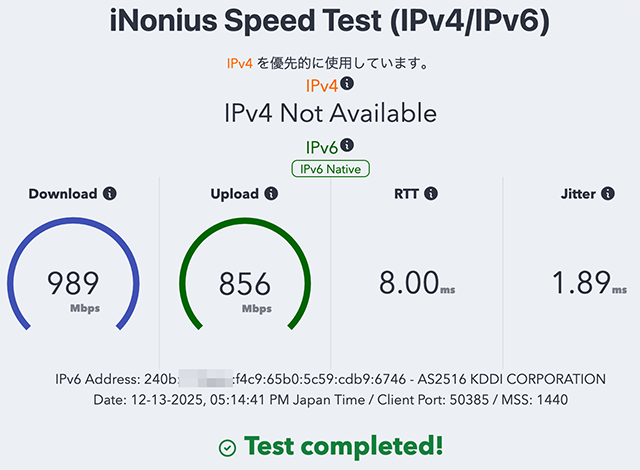
MAP-Eの場合と同様に、GigaEthernet1.0インタフェースに Subnet ID "c9" に設定した固定IPv6アドレスを設定してみる.
  ...

ipv6 dhcp client-profile dhcpv6-cl
  option-request dns-servers
  ia-pd subscriber GigaEthernet1.0 ::/64 eui-64
!
  ...

interface GigaEthernet1.0
  ip address 192.168.1.1/24
  ip dhcp binding dhcpv4-sv
  ipv6 enable
  ipv6 interface-identifier 00:3b:zz:zz:f0:00:00:00
  ipv6 address 240b:xxxx:yyyy:f4c9::fe/64            <=== Subnet IDを指定した固定IPv6アドレスを設定
  ipv6 dhcp server dhcpv6-sv
  ipv6 nd ra enable
  ipv6 nd ra other-config-flag
  no shutdown
!
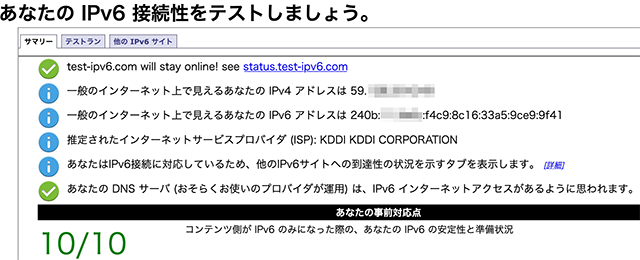
Subnet IDを設定した状態で問題なくIPv4/IPv6デュアルスタックを構成できた
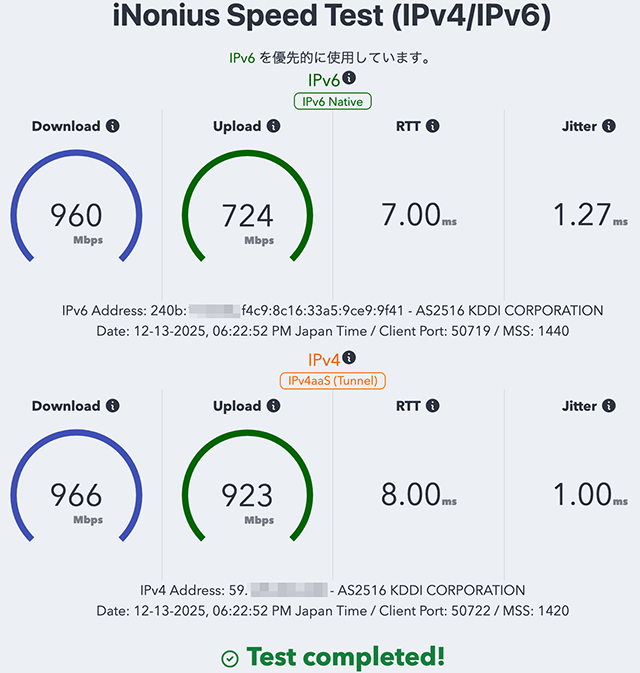
IPv4、IPv6共に問題なくアクセスできている
とりあえず、MAP-Eと固定IPともに単独では、Subnet IDで分割を行っても所望のIPv6 prefix サブネットを構築することができた.しかしながら、当初の想定したMAP-Eと固定IPを同時に併用する場合、Subnet IDを0に設定したセグメントを2つ同時には作成できないようなので、この問題を解決する方法を見出さなくてはならないだろう.
 ...

ipv6 dhcp client-profile dhcpv6pd-client
  option-request dns-servers
  option-request ntp-servers
  ia-pd subscriber GigaEthernet2:1.1 ::/64 eui-64       <=== Subnet ID : 0
  ia-pd subscriber GigaEthernet2:1.2 ::/64 eui-64       <=== Subnet ID : 0
  ia-pd subscriber GigaEthernet2:1.3 ::ca:0:0:0:fe/64
!
上記のようなSubnet IDの割当はエラーとなってインタフェースにIPv6アドレスが設定されない.2つのインターフェースに同じ IPv6 prefix "240b:xxxx:yyyy:f400/64" を設定できない.MAP-Eと固定IPのトンネルは2つとも同じ"240b:xxxx:yyyy:f400/64"に属していなければならないので、上記で行ったような固定IPv6アドレスの設定で逃げるということもできない.
MAP-Eと固定IPのマルチホームインターネット構成のコンフィグ情報(未完成)
v6プラスのMAP-Eと固定IPサービスを1台のルータで同時に稼働させることはかなり困難なことで、とても複雑な実装となってしまった.1つのインタフェースにIPv6のprefixが2系統あるのは不自然で、混乱のもとなのでこのようなトリッキーな構成は避けた方が良いだろう.
MAP-E系のサービスは設定が面倒で中身が複雑過ぎることと、v6プラスのMAP-Eではユーザが使えるポートが240個しかないので、メインのインターネット回線としては明らかに役不足だ.もう少しv6プラスの使い勝手を検証してみるが、検証が終わったらv6プラスとFLET'Sクロスは解約して、FLET'Sギガラインタイプに切り替える予定だ.
  ...
!
ip ufs-cache max-entries 20000
ip ufs-cache enable
ip route default Tunnel1.0
ip dhcp enable
ip access-list acl-dmz199 permit ip src 172.25.199.0/24 dest any
ip access-list acl-vlan200 permit ip src 172.25.200.0/24 dest any
ip access-list acl-vlan201 permit ip src 172.25.201.0/24 dest any
ip access-list acl-vlan202 permit ip src 172.25.202.0/24 dest any
ip access-list allow-outboud permit ip src any dest any
ip access-list icmp-all permit icmp src any dest any
!
!
ipv6 ufs-cache max-entries 10000
ipv6 ufs-cache enable
ipv6 dhcp enable
ipv6 access-list allow-outboud permit ip src any dest any
ipv6 access-list dhcpv6-list permit udp src any sport any dest any dport eq 546
ipv6 access-list dhcpv6-list permit udp src any sport any dest any dport eq 547
ipv6 access-list icmp6-all permit icmp src any dest any
ipv6 access-list icmp6-nd permit icmp neighbor-solicitation src any dest any
ipv6 access-list icmp6-nd permit icmp neighbor-advertisement src any dest any
ipv6 access-list icmp6-nd permit icmp redirect src any dest any
ipv6 access-list icmp6-nd permit icmp echo-reply src any dest any
ipv6 access-list icmp6-nd permit icmp echo src any dest any
ipv6 access-list ip-tunnel-allow permit 4 src any dest any
ipv6 access-list dynamic cache 65535
ipv6 access-list dynamic dyn-outbound access allow-outboud
!
!
proxy-dns ip enable
proxy-dns ip request both
!
usbmem enable
!
ssh-server ip enable
!
http-server username admin
http-server ip enable
!
ddns enable
!
route-map rtmap200-mape permit 10
  match ip address access-list acl-vlan200
  set interface Tunnel0.0
!
route-map rtmap201-fixed permit 10
  match ip address access-list acl-vlan201
  set interface Tunnel1.0
!
ip dhcp profile vlan200profile
  assignable-range 172.25.200.101 172.25.200.199
  subnet-mask 255.255.255.0
  default-gateway 172.25.200.254
  dns-server 172.25.200.254
  domain-name vl200.home.yoko
  lease-time 86400
!
ip dhcp profile vlan201profile
  assignable-range 172.25.201.101 172.25.201.199
  subnet-mask 255.255.255.0
  default-gateway 172.25.201.254
  dns-server 172.25.201.254
  domain-name vl201.home.yoko
  lease-time 86400
!
ip dhcp profile vlan202profile
  assignable-range 172.25.202.101 172.25.202.199
  subnet-mask 255.255.255.0
  default-gateway 172.25.202.254
  dns-server 172.25.202.254
  domain-name vl202.home.yoko
  lease-time 86400
!
ipv6 dhcp client-profile dhcpv6pd-client
  option-request dns-servers
  ia-pd subscriber GigaEthernet2:1.1 ::c8:0:0:0:fe/64
  ia-pd subscriber GigaEthernet2:1.2 ::/64 eui-64
!
ipv6 dhcp server-profile dhcpv6pd-sv200
  dns-server dhcp
!
ipv6 dhcp server-profile dhcpv6pd-sv201
  dns-server dhcp
!
ddns profile ddns-v6plus-profile
  url http://fcs.enabler.ne.jp/update
  query user=A01234567&pass=*********
  transport ipv6
  notify-interface GigaEthernet2:1.2
  source-interface GigaEthernet2:1.2
  update-interval 10
!
device GigaEthernet0
!
device GigaEthernet1
!
device GigaEthernet2
  vlan-group 1 port 1 2 3 4
  vlan-group 2 port 5 6
  vlan-group 3 port 7 8
!
device BRI0
  isdn switch-type hsd128k
!
device USB0
  no shutdown
!
interface GigaEthernet0.0
  description FLET'S X DHCP-PD
  no ip address
  ipv6 enable
  ipv6 dhcp client dhcpv6pd-client
  ipv6 traffic-class tos 0
  ipv6 filter dhcpv6-list 1 in
  ipv6 filter icmp6-all 2 in
  ipv6 filter icmp6-nd 4 in
  ipv6 filter ip-tunnel-allow 5 in
  ipv6 filter reject-all 100 in
  ipv6 filter dhcpv6-list 1 out
  ipv6 filter icmp6-all 2 out
  ipv6 filter ip-tunnel-allow 5 out
  ipv6 filter dyn-outbound 100 out
  no shutdown
!
interface GigaEthernet1.0
  description DMZ
  ip address 172.25.199.254/24
  shutdown
!
interface GigaEthernet2.0
  no ip address
  shutdown
!
interface BRI0.0
  encapsulation ppp
  no auto-connect
  no ip address
  shutdown
!
interface USB-Serial0.0
  encapsulation ppp
  no auto-connect
  no ip address
  shutdown
!
interface GigaEthernet2:1.1
  description v6plus-mape
  encapsulation dot1q 200 tpid 8100
  auto-connect
  ip address 172.25.200.254/24
  ip dhcp binding vlan200profile
  ip policy route-map rtmap200-mape
  ipv6 enable
  ipv6 address 240b:xxxx:yyyy:f400:6a:zzzz:6c00:f400/64
  ipv6 dhcp server dhcpv6pd-sv200
  ipv6 nd ra enable
  ipv6 nd ra other-config-flag
  no shutdown
!
interface GigaEthernet2:1.2
  description v6plus-Fixed-IPv4
  encapsulation dot1q 201 tpid 8100
  auto-connect
  ip address 172.25.201.254/24
  ip dhcp binding vlan201profile
  ipv6 enable
  ipv6 interface-identifier 00:3b:zz:zz:f0:00:00:00
  ipv6 address 240b:xxxx:yyyy:f4c9::fe/64
  ipv6 dhcp server dhcpv6pd-sv201
  ipv6 nd ra enable
  ipv6 nd ra other-config-flag
  no shutdown
!
interface GigaEthernet2:3.0
  description VLAN250-Admin
  ip address 172.25.250.253/24
  no shutdown
!
interface Loopback0.0
  no ip address
!
interface Null0.0
  no ip address
!
interface Tunnel0.0
  description JPIX v6plus MAP-E
  tunnel mode map-e
  ip address map-e
  ip tcp adjust-mss auto
  ip napt enable
  no shutdown
!
interface Tunnel1.0
  description JPIX IPoE Fixed IP
  tunnel mode 4-over-6
  tunnel destination 2404:9200:225:100::65
  tunnel source GigaEthernet2:1.2
  ip address 59.XXX.YYY.ZZZ/32
  ip tcp adjust-mss auto
  ip napt enable
  no shutdown
!

